Adobe Podcast Alternative for Background Noise Removal
If you are looking for an Adobe Podcast alternative for background noise removal, do not start with a generic "best tool" list. Start with what Adobe Podcast is actually good at: fast, browser-based cleanup for spoken audio. It is a strong first test for dialogue that is already understandable and mostly needs noise, echo, or rough room sound reduced.
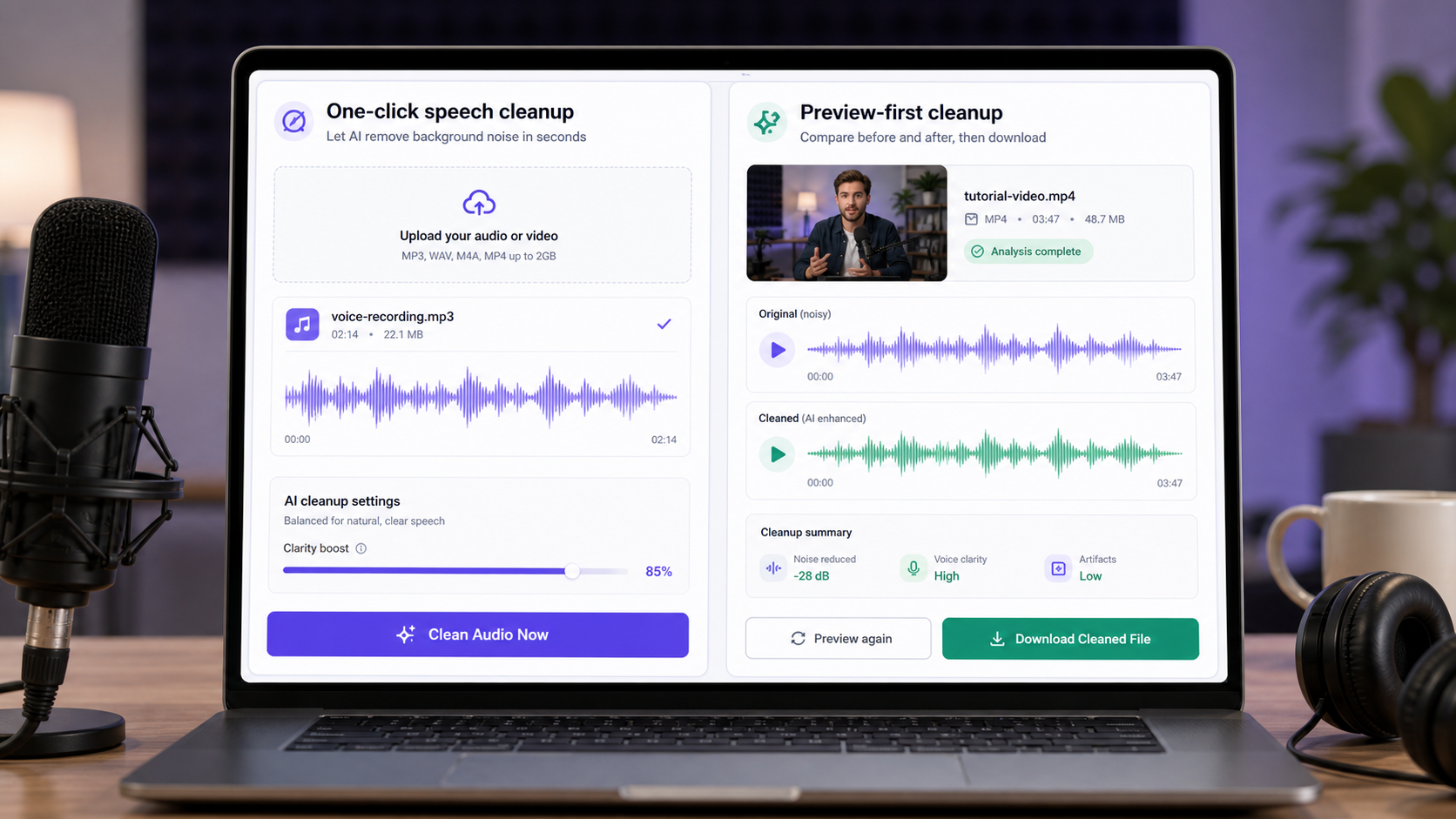
The reason to look for an alternative is not always that Adobe Podcast is bad. Sometimes the file simply needs a different workflow: video-first cleanup, mixed-noise handling, manual control, live-call filtering, or a tool focused specifically on recorded audio and video noise removal. That is where CleanAudio, Audacity, Krisp, or a full editor can each make sense.
For recorded files, CleanAudio's audio noise remover and video noise remover are the most direct alternatives in the CleanAudio stack.
What Adobe Podcast Is Actually Built For
Adobe Podcast is a browser-based audio product with Enhance Speech as the feature most people associate with background noise cleanup. Adobe describes Enhance Speech as a way to make voice recordings sound more like they were recorded in a professional podcasting studio [1]. Adobe's current Podcast homepage also positions Enhance Speech around removing background noise and echo [2].
The product is not just a single old beta upload page anymore. Adobe's public material now connects Enhance Speech to a broader Podcast and Firefly audio workflow. Its technical requirements page says Enhance Speech supports audio formats such as wav, mp3, m4a, aac, and flac, and video formats such as mp4, mov, and m4v, with upload limits that vary by feature and plan [3]. Adobe's plans page also separates free and premium limits: the free plan is audio-only, one file at a time, with no strength adjustment and shorter duration limits, while premium adds video support, bulk upload, and adjustment controls [4].
That tells us a lot without speculating about Adobe's underlying system. Adobe Podcast is optimized for accessible, automatic spoken-audio cleanup. It is not framed like a manual restoration suite, and it is not mainly a live-call noise filter.
Where Adobe Podcast Is Strong
Adobe Podcast is a good first test when the recording is mostly dialogue and the user wants a fast cleanup pass.
Good cases:
- A solo podcast track with room sound.
- A voiceover recorded on a laptop or USB mic.
- A narration file with light echo.
- A talking-head video where the speaker remains clear.
- A user already comfortable with Adobe's web tools.
The strength is low friction. You upload a file, process it, and compare the result. For many creators, that is enough.
The technical reason it works well in these cases is separation. The main voice is already audible, and the unwanted sound is behind it. A speech-focused AI cleanup system has a clear target: preserve the dialogue and reduce the competing layer.
Where an Alternative Starts to Make Sense
An alternative makes sense when the task moves away from simple speech polish.
| Reason to look beyond Adobe Podcast | What it means in practice |
|---|---|
| You need free-plan video cleanup | Adobe's own plans page lists video support under Premium for Enhance Speech [4] |
| You need noise-type-specific workflows | Wind, echo, hum, chatter, and traffic behave differently |
| You need manual control | A tool like Audacity gives noise-profile and effect-chain control |
| You need live-call filtering | Krisp is built around real-time meeting noise cancellation |
| You need preview-first recorded cleanup | CleanAudio is built around uploaded audio/video cleanup and keeping only useful results |
| You need batch or production workflow | Check current plan limits before choosing a tool |
That table is the real comparison. A good alternative is not just "another AI tool." It is a tool whose workflow matches the file.
Best Adobe Podcast Alternatives by Job
| Job | Better first option | Why |
|---|---|---|
| Recorded audio or video with mixed background noise | CleanAudio | Dedicated recorded-file cleanup with preview |
| Manual repair of steady hiss or hum | Audacity | Noise-profile workflow and manual control |
| Live meetings and calls | Krisp | Real-time microphone/speaker noise cancellation |
| Full video edit inside an Adobe timeline | Premiere Pro / Adobe tools | Keeps work inside the editing project |
| Simple spoken audio polish | Adobe Podcast or CleanAudio | Both are reasonable first tests |
| Clipped or buried speech | Retake if possible | Cleanup cannot reliably restore missing detail |
Audacity is not a simpler alternative, but it is a more manual one. Its official noise reduction workflow is built around selecting a noise-only section, getting a noise profile, and applying reduction to the target audio [5]. That can work well for steady noise, but it takes more judgment.
Krisp is not a recorded-file alternative. It belongs to the live-call category. Krisp positions itself around AI noise cancellation for calls and meetings [6]. That is valuable when the conversation is happening now, but it does not solve the same problem as cleaning a podcast episode after recording.
Why CleanAudio Is the Closest Alternative for Recorded Cleanup
CleanAudio is the closest alternative when the user has a recorded audio or video file and wants to remove distracting background noise without building a manual editing chain.
The difference is workflow focus:
- Upload the recorded audio or video.
- Let the hybrid model analyze the file.
- Reduce distracting background noise.
- Preview the result.
- Download only if the voice is clearer and still natural.
That preview step matters because AI cleanup can fail in two directions. It can leave too much noise, or it can remove too much and make the voice sound thin, watery, or artificial. CleanAudio's practical value is the keep-or-reject loop around the actual file.
CleanAudio also splits the problem into clearer routes:
- Remove background noise from audio for podcasts, interviews, voiceovers, and voice notes.
- Remove background noise from video for creator footage, tutorials, and talking-head videos.
- Remove echo from audio when room reflection is the main problem.
- Remove wind noise from video when outdoor buffeting or wind rumble is the main issue.
That matters because "background noise" is not one thing. Echo is reflected speech. Wind is microphone turbulence. Hum can be electrical or mechanical. Chatter can overlap with the main speaker. Treating all of them as one generic cleanup job is how tools get overused.
The Technical Decision: What Kind of Noise Is It?
Before choosing an alternative, classify the file.
| Noise type | Best first thought | Why |
|---|---|---|
| Steady hiss or fan | Noise reduction can often help | The noise is stable and easier to identify |
| Room echo | Use echo-aware cleanup | The unwanted sound is reflected voice, not a separate noise bed |
| Wind | Use wind-specific cleanup or retake | Direct wind can damage the capture at the mic |
| Keyboard clicks | Depends on timing | Clicks under speech are much harder than clicks between words |
| Background chatter | Be cautious | Other voices may overlap with the main voice |
| Clipping | Retake if possible | Distorted speech detail may be gone |
Adobe Podcast may still help in some of these cases. But if the file contains mixed noise, video workflow needs, or a specific problem such as wind or echo, a dedicated cleanup path is easier to judge.
How to Test an Adobe Podcast Alternative
Do not judge by the first five seconds. Test the worst part of the file.
Use this sequence:
- Choose a 20-30 second section with the real problem.
- Process the same section in the tool you are testing.
- Compare at the same loudness.
- Listen for word clarity, not only lower background volume.
- Check whether breaths, consonants, and word endings still sound natural.
- Reject the result if it sounds cleaner but less human.
This is where CleanAudio's preview-first flow is useful. The goal is not to win a feature checklist. The goal is to decide whether this file became easier to publish.
When CleanAudio Is Not the Right Answer
CleanAudio should not be positioned as magic recovery.
Retake or use manual repair when:
- The microphone clipped badly.
- The speaker was too far from the mic.
- Another voice fully covers important words.
- Music is strongly mixed under the speech.
- The file needs detailed creative mixing, not cleanup.
For those cases, the honest answer may be a better recording, a manual editor, or a more involved post-production workflow.
Common Questions
Is CleanAudio an Adobe Podcast alternative?
Yes, for recorded audio and video files where the user wants background noise removal with a preview-first cleanup workflow. Adobe Podcast remains a reasonable first test for simple spoken audio.
Is Adobe Podcast good for background noise removal?
Yes, it can be. Adobe describes Enhance Speech around making voice recordings cleaner, and its public materials mention removing background noise and echo [1][2]. The fit depends on the file and the plan limits.
Which alternative is best for video?
CleanAudio is the more direct fit if you specifically want an online video noise removal workflow. Adobe also supports video in certain Enhance Speech contexts and plans, so check the current limits before choosing.
Which alternative is best for live calls?
Krisp is the better category fit for live calls because it is built around real-time noise cancellation. CleanAudio is for recorded files.
Can any alternative restore missing speech?
No tool should promise that. If the voice is clipped, buried, or missing, cleanup may reduce distraction but cannot reliably rebuild speech detail that was not captured.
References Used for Fact Check
[1] Adobe Podcast: Enhance Speech
URL: https://podcast.adobe.com/en/enhance
[2] Adobe Podcast homepage
URL: https://podcast.adobe.com/en
[3] Adobe Podcast technical requirements
URL: https://helpx.adobe.com/podcast/technical-requirements.html
[4] Adobe Podcast plans
URL: https://podcast.adobe.com/en/plans
[5] Audacity Support: Noise reduction & removal
URL: https://support.audacityteam.org/repairing-audio/noise-reduction-removal
[6] Krisp: AI Noise Cancellation App
URL: https://krisp.ai/