Free vs Paid Noise Removal Tools: What Changes?
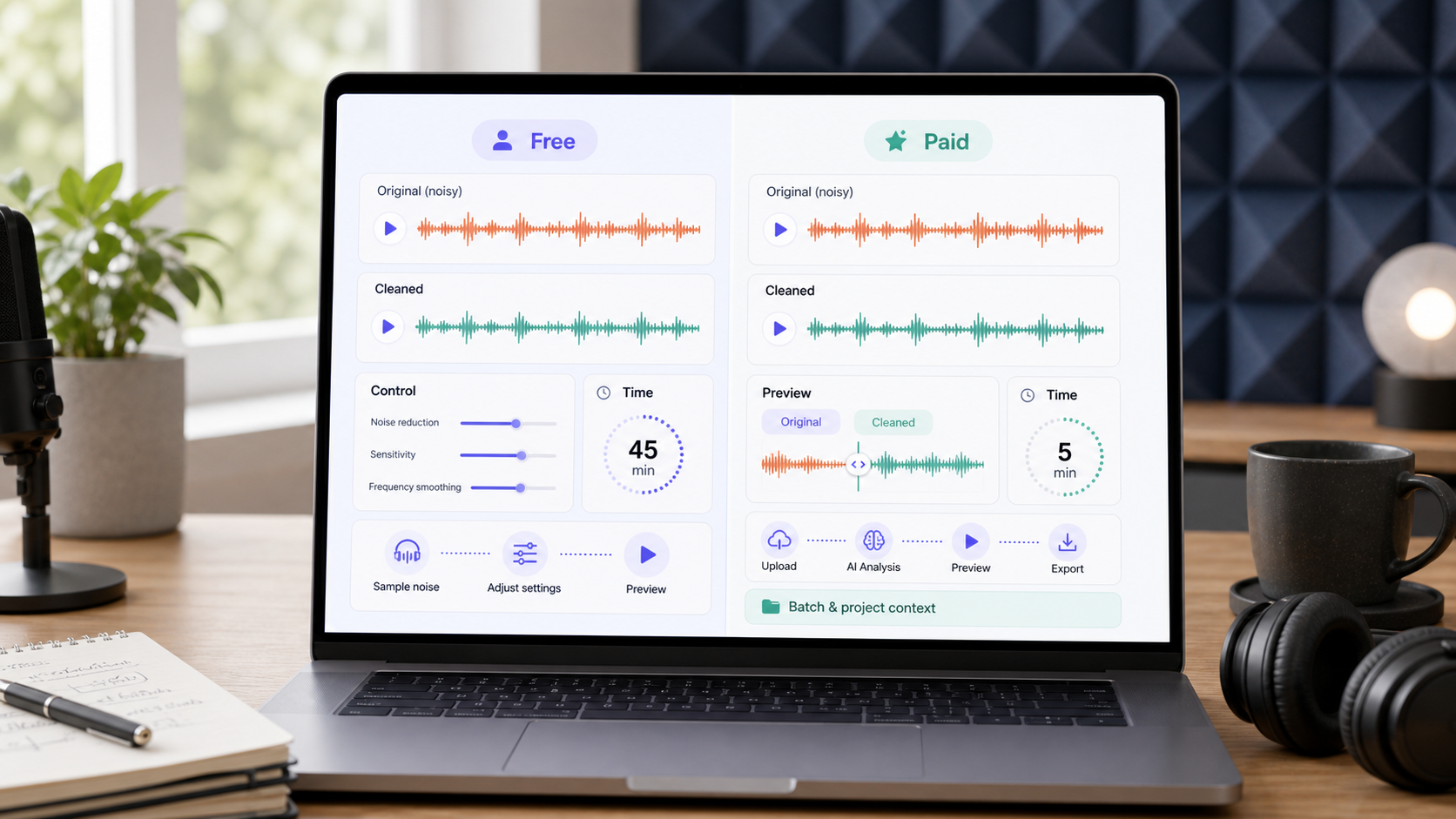 Free noise removal tools can be enough when the noise is simple, the file is short, and you have time to listen carefully. Paid tools usually change the workflow more than the basic goal: better file limits, faster processing, batch or project support, cleaner preview paths, and less manual setup. The practical question is not "free or paid?" It is whether the tool gets you cleaner speech without wasting time or damaging the voice.
If you need to test a file now, start with CleanAudio's AI noise remover. Use remove background noise from audio for audio files and remove background noise from video for video files. For broader context, read best free background noise remover tools and noise removal vs noise reduction.
Free tools are not bad tools. Some are excellent for manual control. The problem is that "free" can hide a cost: setup time, export limits, file-size limits, repeated listening, or poor results on mixed noise. Free but disappointing cleanup is still wasted effort if you have to redo the work.
What Actually Changes When You Pay?
Paid noise removal tools do not magically change the physics of a bad recording. If speech is clipped or covered by another sound, no plan tier can fully restore what was not captured. What paid workflows often change is friction: how quickly you can upload, preview, process longer files, keep video sync, or repeat the same cleanup process across multiple recordings.
There is also a model and compute difference. Many free or real-time workflows are designed to run locally, in a browser, or with low server cost. That often means manual DSP, compact models, or narrower processing paths. RNNoise, for example, is an open-source recurrent-neural-network noise suppression library designed for real-time use [1]. That kind of lightweight approach can be excellent for simple live suppression, but it is not the same product problem as analyzing a long, mixed recording with wind, echo, hum, traffic, room tone, and changing speech levels.
Heavier cloud workflows can spend more compute on analysis, segmentation, and multiple cleanup decisions before the user hears a preview. That compute has a real cost, so unlimited heavy processing is rarely a sustainable free product. The better way to think about paid AI cleanup is not "paid means better." It is: paid workflows can afford deeper processing and a smoother review loop when the file is complex enough to need it.
| Dimension | Free workflow often gives you | Paid workflow often changes | Why it matters |
|---|---|---|---|
| File length | short tests, manual exports, or limits | longer files and fewer interruptions | important for interviews and podcasts |
| Model depth | manual DSP, compact local models, or narrow cleanup paths | heavier analysis and cloud processing may be available | helps on mixed or changing noise |
| Speed | more manual setup | faster preview and processing | saves time across repeated work |
| Control | either very simple or very manual | more workflow options | helps when files vary |
| Consistency | depends on the user | repeatable settings or AI routing | useful for teams and weekly publishing |
| Video handling | may require extra steps | simpler audio/video workflow | avoids sync problems |
| Support and reliability | community docs or self-service | clearer product workflow | matters when content is client-facing |
The difference is not only feature count. It is whether the tool lets you make a clean decision: keep the result, try a lighter pass, switch workflow, or re-record.
When a Free Noise Removal Tool Is Enough
A free tool can be enough when the unwanted sound is stable and the stakes are low. A light hiss, a fan bed, a mild room tone, or a short voice memo can be cleaned with a careful workflow. Audacity's public guidance explains a classic noise-reduction path built around capturing a noise profile from a noise-only section and applying reduction carefully [2]. Audacity's manual also notes that Noise Reduction is aimed at constant background sounds and is not suitable for irregular noise such as traffic or an audience [3]. That boundary is useful: free or local workflows can be strong when the problem is simple and predictable.
Use a free/manual workflow when:
- the file is short enough to review by hand
- the noise is steady, not constantly changing
- you can find a clean noise-only sample
- you are comfortable listening for artifacts
- you do not need a fast video workflow
- the recording is not business-critical
The key is restraint. If a free tool lets you push reduction until the background disappears, that does not mean you should. Heavy processing can make speech dull, watery, or metallic.
When Paid Cleanup Becomes Worth It
Paid cleanup becomes easier to justify when noise removal is not a one-off chore. If you publish podcasts, edit weekly videos, clean customer interviews, or process meeting recordings for a team, the time saved becomes part of the value. A faster workflow is not just convenience; it reduces the number of decisions you have to make per file.
Paid or productized tools are usually worth testing when:
- every file has different noise
- you need audio and video cleanup
- you need a preview-first workflow
- you process long interviews or batches
- the final content affects brand or client perception
- you want less manual setup and fewer effect-chain decisions
CleanAudio fits this part of the decision. It is useful when you want the productized version of the workflow: upload, hybrid model analysis, preview, and download. The goal is not to hide every tradeoff. The goal is to use heavier analysis where it helps, reduce manual routing work, and let you quickly judge whether the cleaned version is better.
Manual Control vs Productized Workflow
Free manual tools and paid AI workflows solve different problems. Manual control is valuable when you know exactly what needs fixing. Productized AI cleanup is valuable when the recording has mixed noise and you do not want to build a repair chain from scratch.
| Recording problem | Manual/free path | Productized AI path |
|---|---|---|
| steady hiss | good fit if sampled carefully | good fit if you want speed |
| hum | possible with careful diagnosis | good if mixed with other noise |
| wind plus voice | difficult and time-consuming | heavier AI analysis is a better first test with preview |
| echo plus room tone | needs dedicated handling | useful if echo cleanup is supported |
| long meeting recording | slow to review manually | faster if voice remains clear |
| video clip | may require export/re-sync | video workflow keeps the path simpler |
This is also why a paid plan is not always "better." If the issue is one click between two words, manual repair may be cleaner than processing the whole file. If the issue is a thirty-minute interview with changing background noise, manual repair becomes a different kind of cost.
The Quality Test Is the Same Either Way
Whether the tool is free or paid, test the result the same way. Listen to the worst sentence, not the easiest one. Compare the original and cleaned audio at the same volume. Check whether the voice still sounds like the same person.
Use this checklist:
- Is the speaker easier to understand?
- Are consonants still clear?
- Does the voice sound natural or processed?
- Is the remaining noise less distracting than the cleanup artifacts?
- Did the tool preserve video sync if the file was a video?
- Can you explain why this result is good enough to publish?
If a tool passes this checklist, it is useful. If it fails, the fact that it was free or paid does not matter.
Common Buying Mistakes
The first mistake is paying for power you do not need. If your only problem is a short steady hiss in one audio file, a free manual editor may be enough. The second mistake is staying free when the work has become repetitive. If you spend an hour cleaning every episode, the free workflow may be expensive in disguise.
The third mistake is chasing silence. Silence is not the goal. Clearer speech is the goal. A small amount of natural room sound is often better than a lifeless voice that has been processed too hard. Adobe's professional restoration tools and Audacity's noise-reduction guidance both imply the same practical reality: the user still has to listen, compare, and stop before artifacts become worse than the noise [2][4].
Decision Framework
| If this is true | Use this first |
|---|---|
| one short file, steady noise, low stakes | free/manual workflow |
| one important file, mixed noise, unclear settings | CleanAudio preview workflow |
| video sync matters | video cleanup workflow |
| repeated podcast or interview cleanup | paid/productized workflow |
| one isolated click or pop | manual repair |
| speech is clipped or buried | retake if possible |
The cleanest decision is often to test the file before buying into a workflow. If CleanAudio gives you a better preview quickly, use it. If a manual editor gives you more control with fewer artifacts, use that. If neither can keep the voice natural, the file may need a lighter touch or a retake.
FAQ
Are paid noise removal tools always better than free tools?
No. Paid tools usually improve workflow, speed, file handling, and repeatability. A free tool can still be the better choice for a short, simple, manually controlled repair.
What is the biggest limitation of free noise removal tools?
The biggest limitation is often time and workflow friction, not basic capability. Free tools can work well, but complex files may require more listening, setup, and manual decisions.
Should I pay for AI noise removal?
Consider it when you clean files often, work with mixed noise, need video support, or value preview speed. Test one real file first rather than judging only by feature lists.
Can paid tools fix badly recorded audio?
They can reduce distraction, but they cannot fully restore speech that was clipped, masked, or never captured clearly. Recording quality still matters.
Sources and Further Reading
[1] Xiph RNNoise project https://github.com/xiph/rnnoise
[2] Audacity Support: Noise reduction and removal https://support.audacityteam.org/repairing-audio/noise-reduction-removal
[3] Audacity Manual: Noise Reduction https://manual.audacityteam.org/man/noise_reduction.html
[4] Adobe Audition: Noise Reduction / Restoration effects https://helpx.adobe.com/audition/desktop/effects-reference/noise-reduction-restoration-effects.html
[5] CleanAudio: AI background noise remover https://www.cleanaudio.io/