How to Remove Background Noise in DaVinci Resolve
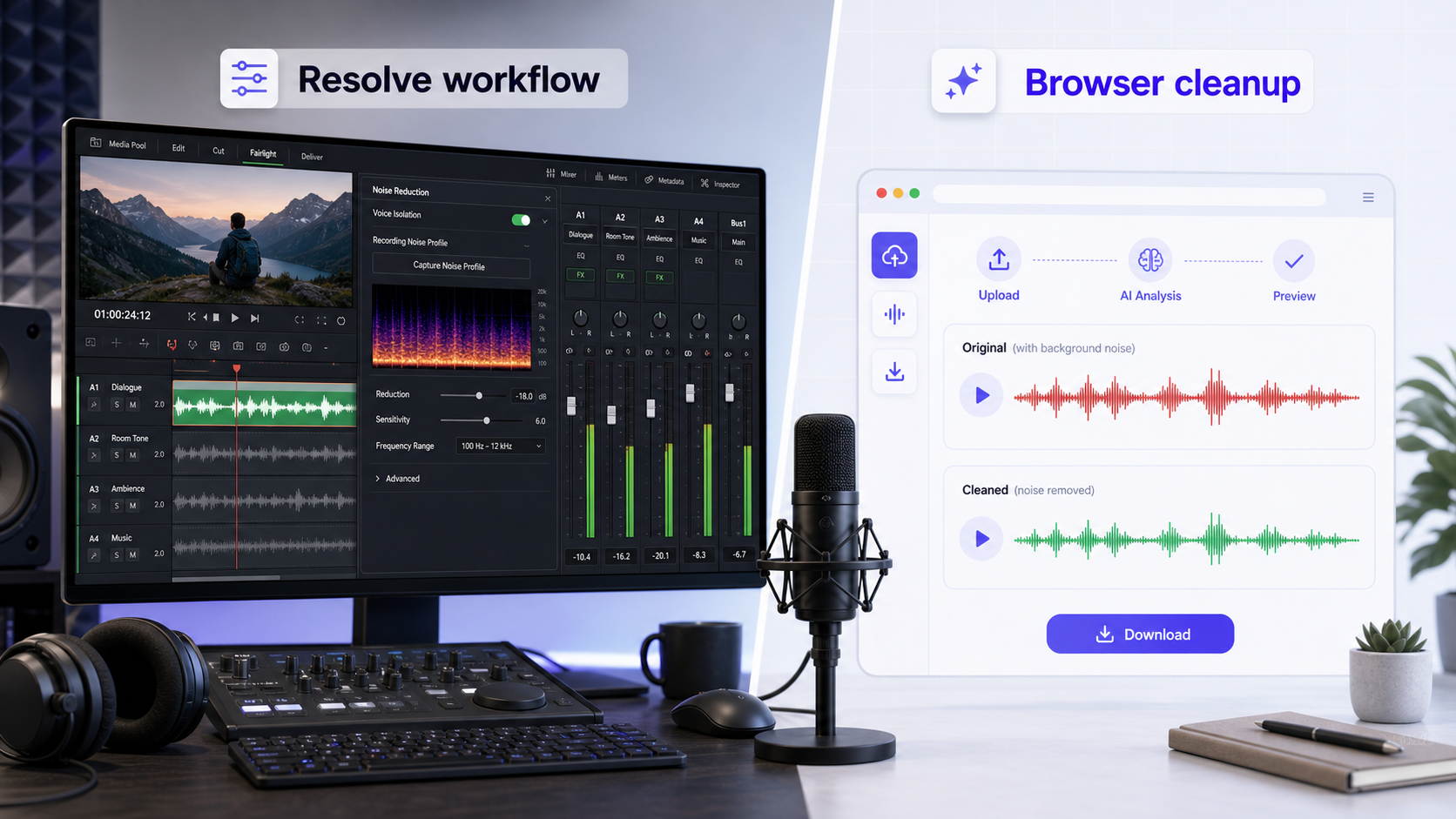
To remove background noise in DaVinci Resolve, use the Fairlight page. Select the noisy clip or track, open the Effects Library, and apply a Fairlight FX cleanup tool such as Noise Reduction where available. Blackmagic Design describes Fairlight as including clean-up and repair plug-ins such as de-esser, de-hummer, and noise reduction, with the option to apply effects to clips or mixer channels [1].
Resolve is the better choice when you need a full post-production environment: video edit, mix, EQ, dynamics, buses, and final delivery. If your job is simply to clean spoken audio from a video file, CleanAudio's video noise remover is usually faster: upload, AI analysis, preview, download.
For broader cleanup concepts, read background noise removal, noise removal vs noise reduction.
Quick Answer
DaVinci Resolve can reduce background noise through Fairlight audio tools. Use the Fairlight page when you need detailed audio work inside a video project. Use CleanAudio when you want a focused browser workflow for clearer voice audio without building a full Resolve audio chain.
The hard part is not finding a button. The hard part is choosing the right treatment for the noise you actually have.
Use Fairlight for Clip or Track Cleanup
Resolve's Fairlight page is built for audio post-production. Blackmagic Design says Fairlight FX plug-ins can be dragged onto a clip or onto a mixer channel to process a whole track [1]. That distinction matters.
Use clip-level processing when one section has a specific problem: a fan starts during one sentence, a camera handling noise appears in one shot, or a short room-tone patch needs reduction.
Use track-level processing when the whole dialogue track has the same issue. A lav mic with steady hum across an interview is a better candidate for track treatment than a timeline full of unrelated camera clips.
The practical Fairlight workflow looks like this:
- Open the project and go to the Fairlight page.
- Play the clip and decide whether the noise belongs to one clip, one track, or the whole mix.
- If it is one clip, select that clip in the timeline. If it is the whole dialogue track, work from the mixer channel instead.
- Open the Effects Library and look for the relevant Fairlight FX cleanup tool.
- Apply the effect to the clip or channel.
- Start with a conservative setting. Do not try to remove every trace of background sound in one pass.
- Play the clip before and after the noisy moment. Listen for voice damage, not just lower noise.
- Bypass the effect and re-enable it so you can compare at the same loudness.
This is where Resolve is powerful. It lets you place treatment exactly where it belongs. It also means the user needs to understand routing, clip vs track processing, and the difference between noise, EQ, dynamics, echo, and bad capture.
What Fairlight Noise Reduction Is Good For
Fairlight is useful when you want control. You can hear the result in the mix, combine cleanup with EQ and dynamics, and make decisions at clip, track, or bus level.
It is a good first choice when:
| Recording problem | Better first workflow |
|---|---|
| Dialogue already edited in Resolve | Fairlight |
| Steady hum or hiss on one track | Fairlight or CleanAudio |
| One video file needs quick voice cleanup | CleanAudio |
| Mixed noise across many short clips | CleanAudio first, then edit |
| Clipped speech or fully buried words | Retake or rescue attempt only |
Fairlight is deep. That depth is useful when you are mixing. It can feel heavy when you only need a cleaner voice preview.
Professional vs Simple: Resolve and CleanAudio
DaVinci Resolve is the most post-production-heavy comparison in this group. It is built for people who may need edit, color, sound, delivery, and a full finishing workflow. CleanAudio is narrower by design.
| Dimension | DaVinci Resolve / Fairlight | CleanAudio |
|---|---|---|
| Professional depth | Very high. Full post-production audio environment with clip, track, mixer, and effect routing. | Professional enough for creator voice cleanup, with the audio decisions productized. |
| Simplicity | Low to medium. Powerful, but users must understand where and how to apply treatment. | High. Upload, AI analysis, preview, download. |
| Best use | You are finishing a project and need detailed audio control inside Resolve. | You need clearer speech from a video file without learning a deep audio post workflow. |
| Weak point | Overkill for one noisy talking-head clip or a quick creator workflow. | Not a full Fairlight mix, and not a replacement for deep post-production work. |
This is not a claim that CleanAudio replaces Resolve. It is a claim about fit. For many creators, the required job is not "mix a film." It is "make this voice easier to hear before I publish." CleanAudio is built for that level of professional cleanup without the full post-production learning curve.
When CleanAudio Is Faster
CleanAudio is not trying to replace a full Resolve mix. It removes the setup work when the file's main problem is distracting background noise.
Upload the video, let the hybrid model analyze the audio, preview the cleaned result, and download if the voice is clearer. That is useful before a rough cut, before sending a client preview, or when a creator has one noisy talking-head video and does not want to learn a full Fairlight workflow.
This is the same productized cleanup principle we use across CleanAudio content: understand the problem enough to set expectations, then let the workflow reduce manual decisions. Different segments can need different noise reduction treatment. The user should not have to build that routing by hand every time.
Use CleanAudio before Resolve when the source clip is noisy and you want a cleaner starting point. Use Resolve after CleanAudio when you still need editing, color, music, levels, and final delivery. Use Resolve alone when the audio is part of a larger post-production mix and you need full control over every treatment.
For creator work, the combined workflow is often the cleanest compromise. Clean the source clip first when the voice is the obvious problem, then do the edit in Resolve. If the project later needs detailed mixing, Fairlight is still there. You have not removed the professional option; you have simply avoided making every small creator clip start with a full post-production audio session.
Do Not Confuse Noise, Echo, and Bad Capture
Background noise is not the same as room echo. Noise is an unwanted sound behind the voice. Echo and reverb are reflected voice energy. If the recording sounds hollow or distant, use a dedicated workflow such as remove echo from audio rather than only broad noise reduction.
Noise reduction also cannot reliably repair clipping. If the microphone input was overloaded, some detail is already missing. You can try cleanup, but keep the original and listen for distortion.
If wind is the main issue, use remove wind noise from video. Wind buffeting behaves differently from steady hum.
A Practical Resolve Workflow
Start with a duplicate or a saved project version. Apply cleanup lightly, then compare the original and processed audio at the same playback level.
A sensible workflow looks like this:
- Identify whether the problem is steady noise, clicks, echo, wind, or clipping.
- Decide whether the problem belongs to one clip or an entire track.
- Apply a Fairlight cleanup tool only where it fits.
- Listen for artifacts before exporting.
- Use CleanAudio when the file needs fast voice cleanup before or outside the edit.
This avoids the common mistake: adding multiple repair effects before naming the actual problem.
If you are new to Fairlight, keep the first pass boring. Fix the biggest distraction first. Do not add EQ, compression, noise reduction, and loudness changes all at once, because then you will not know which step helped and which step damaged the voice.
FAQ
Can DaVinci Resolve remove background noise?
Yes. Resolve's Fairlight page includes clean-up and repair plug-ins, and Blackmagic Design describes noise reduction among those Fairlight FX tools [1]. Results depend on the recording and the effect settings.
Should I use Resolve or CleanAudio?
Use Resolve when you are already editing and mixing inside a project. Use CleanAudio when you want a fast browser workflow to clean spoken audio from a video file.
Can Resolve fix wind noise or echo?
It may help, but wind and echo are different problems from steady background noise. For focused workflows, use remove wind noise from video or remove echo from audio.
Will noise reduction damage voice quality?
It can if pushed too hard. Heavy reduction may make speech thinner, metallic, or less natural. Always preview before replacing the original audio.
References Used for Fact Check
[1] Blackmagic Design: DaVinci Resolve Fairlight
URL: https://www.blackmagicdesign.com/products/davinciresolve/fairlight