Can AI Fix Bad Audio? What It Can and Cannot Recover
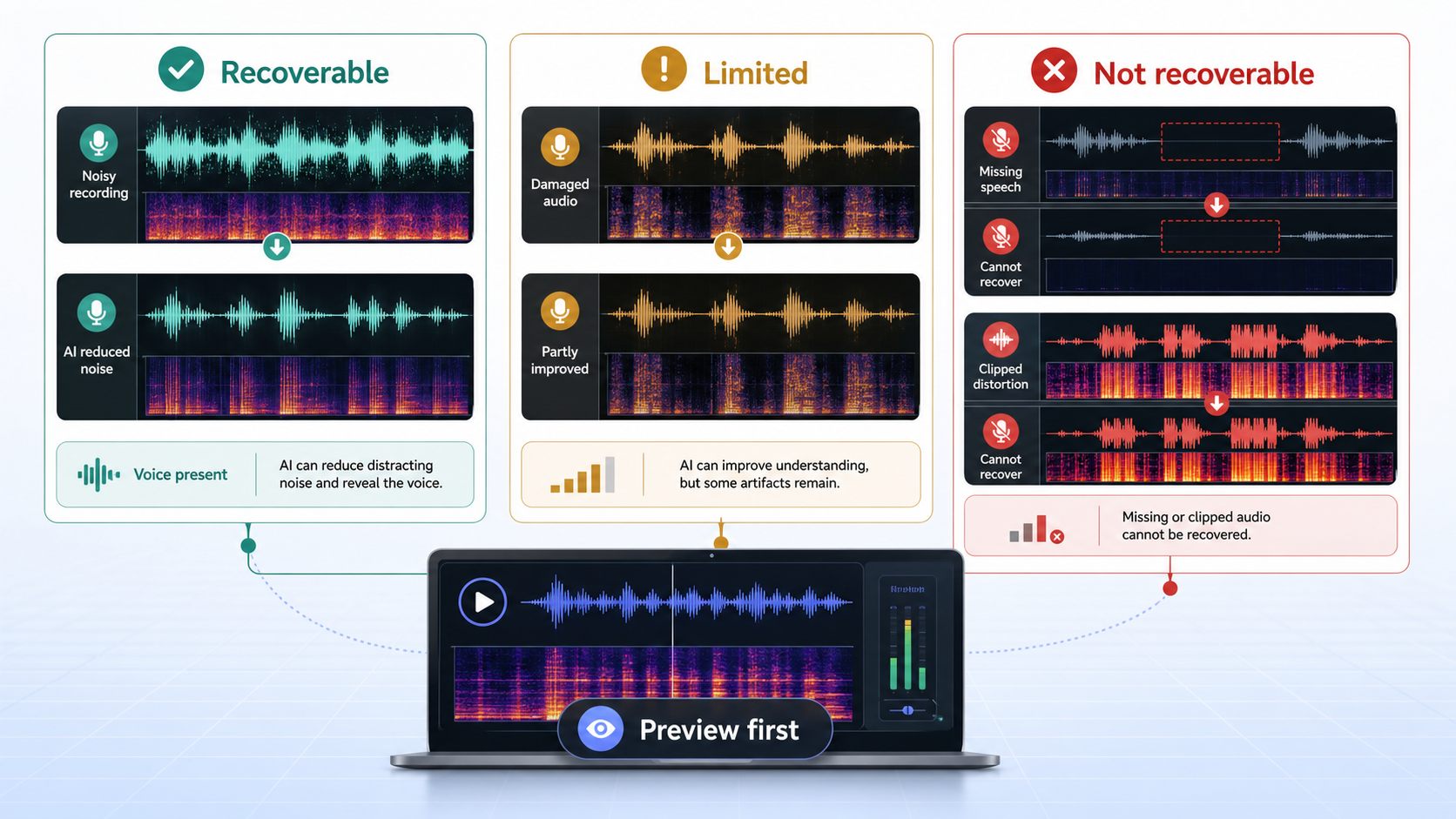
AI can fix some bad audio, but not all bad audio. It can reduce distracting background noise, make speech easier to understand, and sometimes improve a rough recording enough to publish. It cannot reliably recover speech that was never captured, fully undo clipping, or separate multiple people talking over each other with perfect accuracy.
The practical question is not whether AI is powerful. The practical question is whether the voice is still present. If the answer is yes, CleanAudio's AI noise remover is worth testing. Upload the file, preview the cleaned result, and keep it only if the voice is clearer and still natural.
For related boundaries, see why background noise removal fails, how to choose the right noise reduction strength, and why noise removal can make voice sound robotic.
The Useful Answer: Three Buckets
Most bad audio falls into one of three buckets.
| Bucket | Examples | What AI can usually do |
|---|---|---|
| Recoverable | Hum, hiss, fan noise, room tone, moderate wind, light background chatter | Reduce distraction and reveal speech |
| Limited | Echo, distant voice, mixed cafe noise, compressed phone audio, heavy wind | Improve intelligibility, but artifacts or residue may remain |
| Not recoverable | Missing words, severe clipping, dropouts, fully masked speech, multiple overlapping speakers | Little or no true recovery |
That table is the honest starting point. AI cleanup is strongest when it has enough speech information to preserve. When the recording is missing speech detail, a model can only infer so much.
The Technical Core: Signal, Masking, and Missing Information
Audio cleanup is a separation problem. The tool must decide what belongs to the voice and what belongs to the unwanted sound. The more separate those signals are, the easier the job becomes.
A steady fan under a clear voice is relatively friendly. The fan is stable, the voice changes over time, and the model can reduce the steady layer while preserving speech. A sudden keyboard click over a consonant is harder because it occupies the same moment. Room echo is harder again because the unwanted sound is delayed voice energy, not an unrelated background layer.
Clipping and dropouts are different. Clipping means the recorder overloaded and flattened part of the signal. Dropouts mean information is missing. Restoration tools can sometimes make damaged audio less harsh, but they cannot guarantee reconstruction of the original performance. That is why professional repair workflows still rely on previewing, adjusting, and accepting limits rather than promising perfect recovery [1][2].
What AI Can Usually Improve
AI is useful when the recording has a real voice plus distracting layers around it:
- Air conditioner or fan noise under speech.
- Hiss from a microphone or preamp.
- Low room bed in a voice memo.
- Moderate wind that does not cover whole words.
- Light cafe noise where the speaker is still dominant.
- Video audio where the picture is fine but the sound feels unprofessional.
These are good candidates for remove background noise from audio or remove background noise from video. The right success metric is easier listening, not total silence.
What AI Can Only Partly Improve
The middle bucket is where expectations matter.
Echo can sometimes be reduced, but reflections overlap the voice. Distant microphones can be improved, but they often captured too much room and too little direct speech. Compressed phone audio can become clearer, but the source may remain narrow and grainy. Wind can be reduced when the dialogue survives, but violent gusts can cover or distort words.
In these cases, preview matters more than feature names. A tool can be technically impressive and still produce a result you should reject for that file.
What AI Cannot Truly Recover
AI cannot reliably restore:
- Words missing because the connection dropped.
- Speech completely covered by another loud sound.
- Severe digital clipping where waveform peaks are flattened.
- Two speakers talking over each other at the same level.
- A distant voice recorded so quietly that room noise dominates it.
That does not mean trying cleanup is pointless. It means the result should be judged as a rescue attempt, not a promise of reconstruction.
CleanAudio's Role: Fast Triage, Then Better Decisions
CleanAudio is useful because it turns the uncertainty into a quick test. Upload the file, let the hybrid model analyze the recording, preview the cleaned version, and decide from the actual audio instead of guessing.
The hybrid-model approach matters because real recordings are rarely one clean problem. A single file may contain room tone in the intro, keyboard noise during a screen share, echo in one section, and fan noise throughout. A rigid one-effect workflow asks the user to diagnose and tune every part. A productized cleanup workflow reduces that burden by analyzing the recording and applying suitable cleanup behavior across sections.
That does not remove human judgment. You still listen. You still reject overprocessed results. But you do not have to start by building an effects chain.
Manual Tools Still Matter
Manual editors are still the right choice when the repair is specific:
- Cut a cough.
- Fade a transition.
- Repair one click.
- Lower a single loud breath.
- Choose exact ambience between edits.
Audacity's profile-based noise reduction is useful when the noise is stable and sampleable [1]. Adobe Audition's restoration effects offer a broader repair toolkit [2]. Those tools are valuable when you want control and have time to listen carefully. AI cleanup is valuable when the source has mixed noise and you want a fast, practical preview.
A Practical Decision Framework
Use this sequence before spending an hour on repair:
- Listen to the worst 10 seconds.
- Ask whether the voice is still understandable.
- If yes, try cleanup once at a moderate setting.
- If the voice improves naturally, continue.
- If the voice gets robotic or hollow, reduce strength or switch workflow.
- If words are missing, clipped, or buried, plan a retake or alternate edit.
This framework protects time. It also protects the voice. Many bad results come from trying to force software to solve a recording that needed a different decision.
Prevention Still Beats Cleanup
Cleaner capture gives any tool more to work with. DPA's speech intelligibility guidance points back to the same fundamentals: mic placement, direct voice capture, and reducing competing noise before recording [3].
For future recordings:
- Move the microphone closer.
- Record a test before the real take.
- Turn off avoidable noise sources.
- Use a quieter room.
- Avoid clipping by leaving headroom.
- Use wind protection outdoors.
AI cleanup is a strong second chance. It is not a replacement for giving the model a usable voice signal.
FAQ
Can AI fix bad audio completely?
Sometimes AI can make bad audio much easier to understand, but complete repair depends on what was captured. Missing words, severe clipping, and fully masked speech are not reliably recoverable.
Can AI remove background noise from audio and video?
Yes, when the voice is still present and the noise is distracting rather than fully covering speech. CleanAudio supports both audio and video cleanup workflows.
Why does AI cleanup sometimes sound robotic?
Robotic sound usually happens when cleanup removes or reshapes parts of the voice along with the noise. It is more common when noise overlaps speech heavily or processing is too strong.
Should I retake or try AI cleanup first?
If a retake is easy and the recording matters, retake. If the moment cannot be repeated, try cleanup and judge the preview honestly.