How to Reduce Room Tone in Audio Recordings
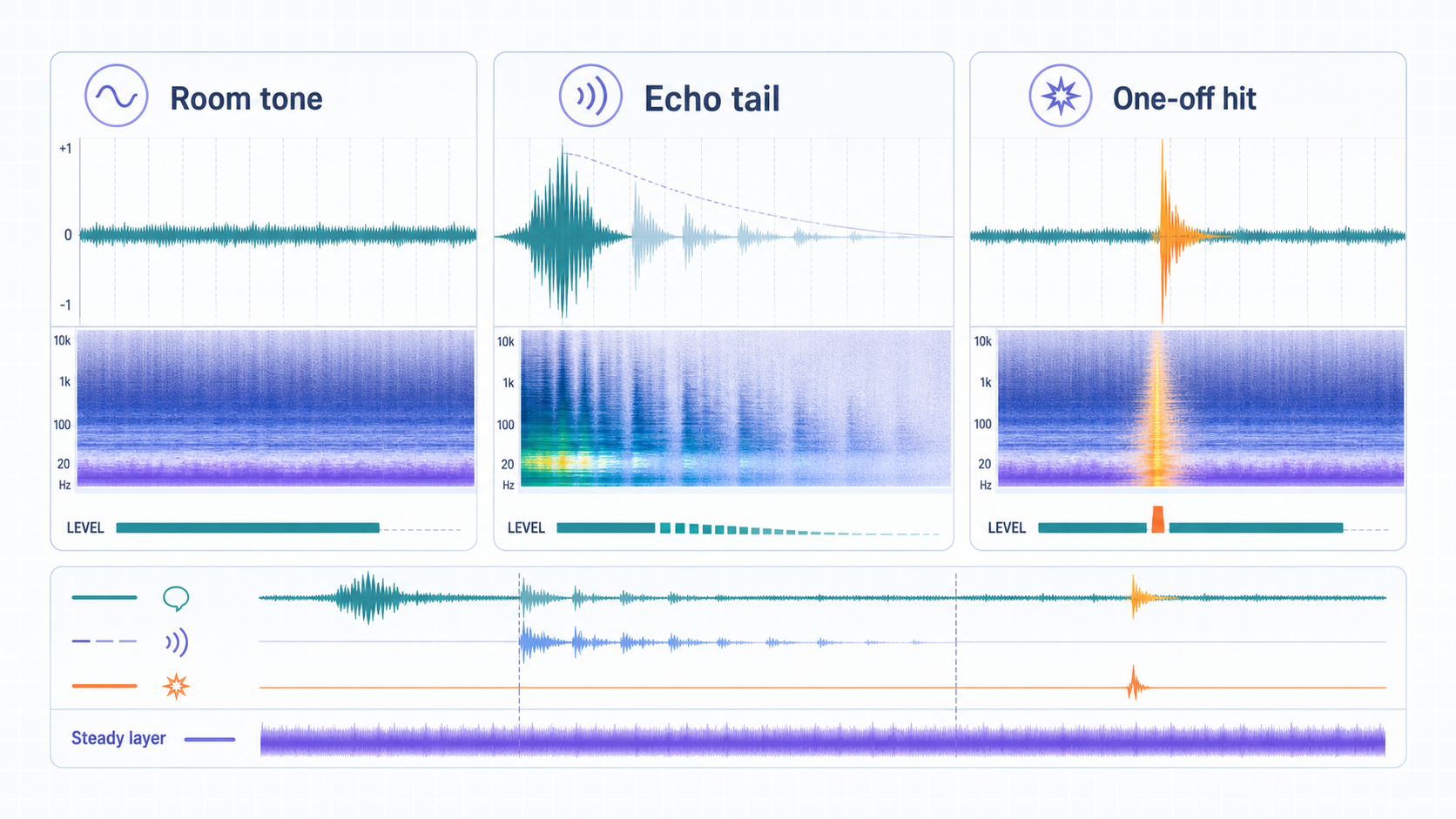
Room tone is the steady sound of the recording space: air movement, distant HVAC, computer fans, street wash through a wall, or the low bed of a room that never becomes truly silent. To reduce room tone in audio, first confirm it is a steady layer, then use a light cleanup workflow that lowers the bed without damaging the voice.
This article is intentionally narrower than how to remove room noise from a recording. Room noise is the larger category. Room tone is the steady baseline. Echo, keyboard hits, chair squeaks, and passing cars are related problems, but they are not the same repair job.
If your goal is quick cleanup, start with CleanAudio's audio noise remover. If the room sound is mainly reflection or hollow tail, use remove echo from audio instead.
Room Tone vs Room Noise vs Echo
The distinction matters because the wrong treatment can make a voice worse.
| Term | What it sounds like | Best first move |
|---|---|---|
| Room tone | Constant bed under the whole recording | Light noise reduction or AI cleanup |
| Room noise | Broader category including HVAC, fans, traffic, movement, echo, and hum | Diagnose source, then choose workflow |
| Echo or reverb | Voice reflections that trail after speech | Echo-aware cleanup, not ordinary noise reduction |
| Hiss | High-frequency steady noise | Gentle high-frequency noise reduction |
| One-off noise | Click, bump, cough, chair squeak | Cut, local repair, or retake |
This is why a room-tone article should not tell everyone to use one slider. The sound may be steady, but it can sit close to the voice. The goal is to reduce distraction, not erase the room completely.
How to Diagnose Room Tone
Listen in three places:
- A quiet gap before speech.
- A sentence where the speaker talks at normal volume.
- The end of a phrase where the voice fades out.
If the same bed continues under all three moments, you probably have room tone. If the sound blooms after each word, you are hearing echo or reverb. If it appears as isolated spikes, it is not room tone.
In a waveform, room tone often looks like a low, continuous layer. In a spectrogram, it may appear as horizontal bands or a soft broadband floor. That does not mean you need to become a spectral editor. It just explains why stable room tone is more treatable than random noise.
Automated Cleanup-First Workflow
Use this path when the recording has a steady bed plus some mixed real-world noise:
- Upload the original file before heavy editing.
- Run a moderate cleanup pass.
- Preview a phrase where the voice is quiet, not only the loudest line.
- Compare raw vs cleaned at normal listening volume.
- Keep the cleaned file only if the voice is clearer and still natural.
CleanAudio fits this path because its workflow is built around source-file preview. The hybrid model analyzes the recording, routes different sections toward suitable cleanup behavior, and gives you a result to judge before download. That is useful when the room tone is not perfectly isolated or when the recording also has hum, hiss, or soft background movement.
Manual Editor-First Workflow
Use a manual editor-first workflow when the room tone is stable and you have a clean room-only sample.
A practical manual workflow looks like this:
- Select a short section where no one is speaking and only the room tone is present.
- Capture or learn that noise profile if your editor supports profile-based reduction.
- Apply a light reduction to a copied version of the recording.
- Preview words with soft consonants, because those are easy to damage.
- Reduce the amount if the voice becomes dull, phasey, or metallic.
- Use fades or ambience carefully so cuts do not jump from room bed to dead silence.
Audacity's Noise Reduction process is a clear example of this logic: it first gets a noise profile, then applies reduction to the selected audio [1]. That works best when the noise is stable and sampleable. It is less ideal when the room sound changes during the recording.
Why Silence Is Not the Goal
Room tone is not always a defect. In film, podcast, and interview editing, a small amount of consistent room tone can make cuts feel natural. Dead silence between phrases can sound more artificial than a soft room bed.
The editorial target is intelligibility and comfort:
- The listener should not strain to hear the speaker.
- The room should not feel like it is swallowing the voice.
- Edits should not jump between noisy and silent backgrounds.
- The cleaned voice should not sound stripped of texture.
This is the same reason restoration tools expose adjustable controls. Adobe Audition's restoration effects are powerful, but the workflow still depends on previewing, adjusting, and avoiding artifacts [2].
When Room Tone Is Actually a Recording Problem
Room tone becomes a problem when it competes with the voice. That usually happens because the microphone is too far away, the room is hard and reflective, or a steady source like HVAC is close to the mic.
Capture-side fixes help more than late rescue:
- Move the speaker closer to the microphone.
- Turn off loud HVAC or move away from vents when possible.
- Put soft material near reflective surfaces.
- Avoid placing the mic on a vibrating desk.
- Record 10 seconds and listen before the full session.
DPA's speech intelligibility guidance supports this basic principle: cleaner capture and better microphone placement improve how clearly speech can be understood before processing begins [3].
Common Mistakes
| Mistake | What it causes | How to avoid it |
|---|---|---|
| Removing all room tone | Cuts can sound unnatural and exposed | Leave a light natural bed if it helps continuity |
| Using a noisy speech section as the profile | The reducer may learn the voice as noise | Capture only room tone when using a profile |
| Applying one heavy pass | Voice texture can become thin or metallic | Use one moderate pass and preview |
| Treating echo as room tone | Reflections remain or voice gets damaged | Use an echo-specific workflow |
| Ignoring mic distance | The room stays louder than the voice | Improve recording setup next time |
FAQ
Is room tone the same as background noise?
Room tone is one kind of background noise: the steady ambient bed of a space. Background noise is broader and can include wind, traffic, keyboard clicks, hum, echo, and other sounds.
Can room tone be removed completely?
Sometimes it can be reduced heavily, but complete removal is not always desirable. A small consistent bed can make speech edits sound natural.
Should I use AI cleanup or manual noise reduction?
Use AI cleanup when the recording has mixed noise or you want a fast preview. Use manual profile-based reduction when the room tone is stable and you have a clean room-only sample.
Why does room tone reduction make voices sound strange?
The room tone may overlap with parts of the voice. Heavy reduction can remove texture from speech along with the background layer.