How to Remove Echo from Audio Online
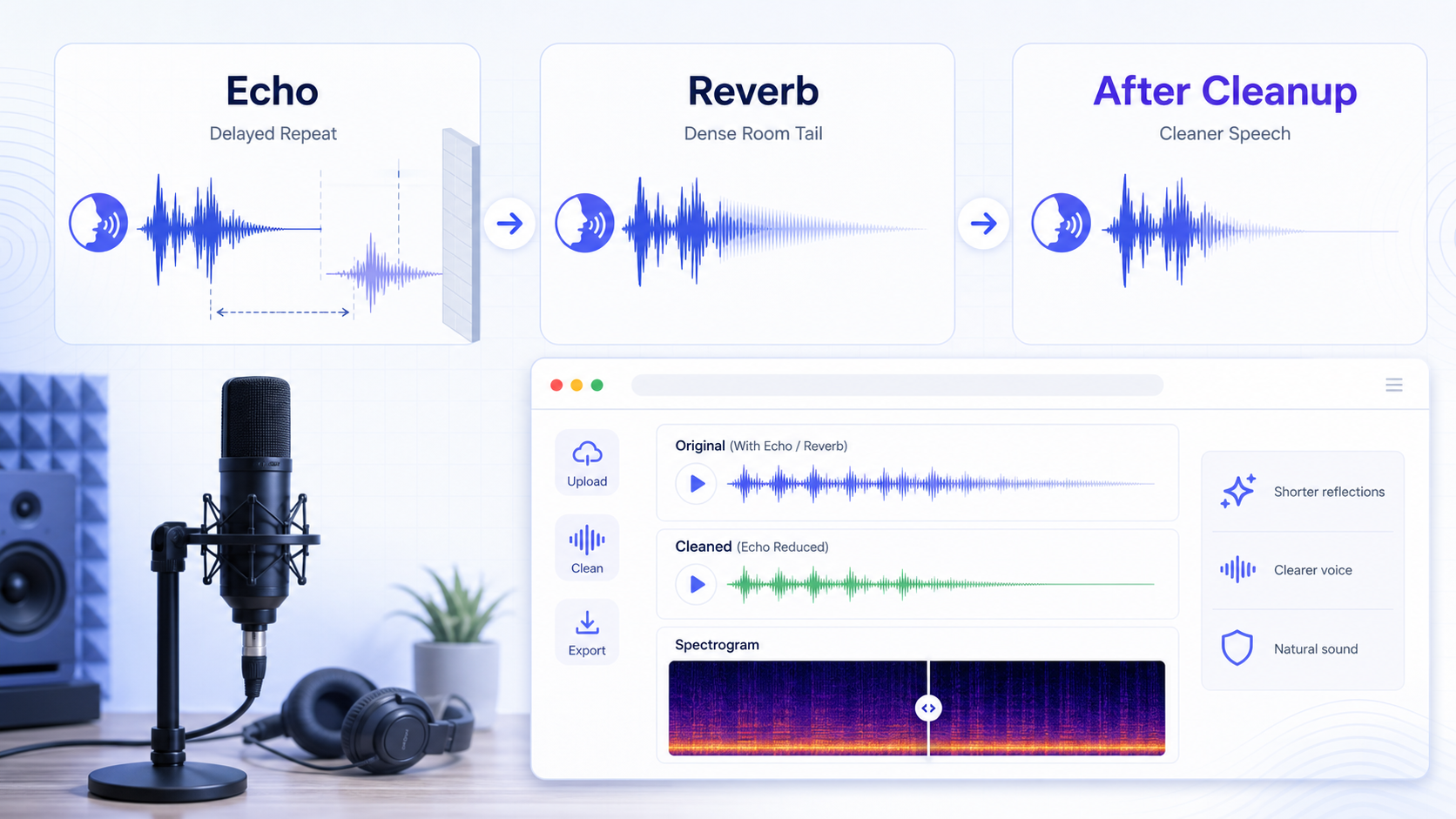
To remove echo from audio online, first decide whether you are hearing a light room tail or obvious repeated reflections after each phrase. A light room tail can often be reduced enough to make speech easier to follow. A distant recording in a bare room, where every word throws reflections behind it, is much harder. In that case, cleanup can shorten the echo impression, but it usually cannot recreate the dry close-mic voice that was never captured.
That difference is physical, not marketing language. DPA's microphone guidance explains that echo and reverb come from reflections off hard surfaces, and its speech-intelligibility guidance is blunt that too much room reflection ruins intelligibility [1][2]. Adobe's DeReverb documentation sits in the same reality: it is a restoration tool with adjustable processing, not a promise of perfect reversal [3].
If you need a quick rescue check instead of building a full manual chain, CleanAudio's echo cleanup workflow is useful when the direct voice is still understandable but the reflected tail keeps pulling the recording backward. For related reading, see background noise removal, types of background noise in recordings, and how to remove background noise from a microphone.
Echo, Reverb, and "My Room Sounds Bad" Are Related but Not Identical
Search results often flatten everything into echo. That is not how the cleanup problem behaves.
A discrete echo is a delayed repeat you can hear as a separate bounce. Room reverb is a dense cluster of short reflections that extends the tail of the sound instead of repeating it as one obvious slap. In small untreated rooms, most speech recordings sit somewhere between those two extremes: not fully dry, not a dramatic canyon echo, but reflective enough that every sentence sounds farther away than it should.
DPA's acoustics guidance is useful here because it keeps the focus on decay time and intelligibility [2]. When the room holds sound after the speaker stops, those reflections keep arriving after the direct speech. That means the cleanup job is not just remove a background layer. It is reduce overlapping copies of the same voice.
That overlap is why echo cleanup has harder limits than steady hiss cleanup:
- The reflected sound contains the same frequencies as the speech.
- The reflections change as the speaker moves or turns.
- A far microphone captures more room along with the voice.
- Aggressive de-reverb can flatten the room tail but also damage body and clarity.
If you understand that mechanism, the rest of the workflow makes more sense. You are not subtracting a separate machine noise. You are trying to reduce extra room copies of the voice without thinning the voice itself.
The First Check: Is the Direct Voice Still Leading?
If the direct voice still arrives clearly and the room tail only lingers behind it, cleanup is worth trying.
If the speaker sounds distant from the first word, syllables blur together, and every pause blooms with reflections, the recording problem is probably larger than an online fix. Shure's recording guide makes the capture side of this clear: keeping the mic closer reduces room reflections before they become part of the file [4].
A practical test is simple:
- Play the first sentence.
- Play the end of a short word like "test" or "clip."
- Listen to what happens right after the consonant.
If the consonant is still sharp and the room tail follows it, de-reverb has a fair chance. If the consonant already sounds soft and smeared, cleanup is more likely to trade one problem for another.
Remove Echo Online: A Complete Workflow
Use the original recording, not an export that has already been strongly denoised or compressed. Before uploading, note one reflective sentence, one word with a clear ending, and one pause. These are checkpoints for the complete result; CleanAudio selects its preview segment automatically.
- Upload the original file. Keep the untreated copy available for comparison.
- Let CleanAudio analyze the recording. Its hybrid model can route echo and other noise conditions without asking you to design a de-reverb chain.
- Listen to the system-selected preview during speech. A useful result shortens the distracting room tail while preserving the speaker's body, consonants, and word endings.
- Reject false cleanliness. A dry pause is not enough. If active speech becomes papery, narrow, phasey, or less intelligible, keep the original.
- Download only when the preview is better. Review the complete output at the reflective sentence, the word ending, and the pause you noted before upload.
- Check the file in its real context. Play it beside adjacent clips, music, or another speaker. Uneven room tone can make an isolated improvement sound like an obvious edit in the program.
This route is strongest when the direct voice still leads and the reflections sit behind it. If every syllable is distant and smeared, use the preview as a rescue test rather than expecting a dry studio voice.
Optional Manual De-Reverb
Use a manual editor when you need direct control or only part of the file is reflective.
- Duplicate the track and loop a sentence with an obvious tail.
- Select the spoken region or track to process, then open a de-reverb or room-reduction control. Do not use a broadband hiss profile as a substitute; the reflection is a delayed copy of the voice.
- Start at the lowest useful amount and bypass the effect repeatedly. Increase it only while the tail becomes shorter and the direct voice remains stable.
- Compare the opening consonant, a sustained vowel, the end of the phrase, and the following pause.
- Back off as soon as the voice becomes hollow, phasey, papery, or narrower than the original. Return to the untreated duplicate instead of stacking another processor to repair the artifact.
- Export a short test before processing the complete file.
If echo varies by scene, process sections separately and smooth the boundaries. One global setting often overprocesses closer lines while doing too little for distant ones.
What to Listen for After Cleanup
- Better: the sentence stops sounding like it was recorded across the room.
- Better: pauses end sooner and the next phrase starts more cleanly.
- Warning sign: consonants lose bite or the whole track turns papery.
- Warning sign: the room tail shrinks, but the voice also gets oddly narrow.
If the warning signs appear, back off. A slightly live room is usually less distracting than a lifeless robotic voice.
Why Close-Mic Fixes Beat De-Reverb Fixes
The most reliable way to fix echo is still to record less room in the first place.
Shure's spoken-word guidance recommends keeping the microphone relatively close to the mouth so it captures more direct sound and less room reflection [4]. That one capture choice changes the ratio between voice and reflections before cleanup begins. DPA's room-acoustics notes point in the same direction from the room side: speech benefits from a short reverberation time [2].
In practical terms, the fixes that help most are:
- Move the microphone closer to the speaker.
- Use a directional mic when the setup allows it.
- Keep hard reflective surfaces away from the microphone path.
- Add absorption around the speaking position instead of only behind the computer.
- Record a short test line and listen on headphones before the full take.
That last step is where many reflective-room problems should have been caught. Cleanup is useful, but it is much better as a rescue tool than as a permanent replacement for mic placement.
Where Echo Cleanup Reaches Its Limit
Online or manual cleanup is a strong fit when the recording is voice-first, the speaker remains easy to understand, and the room tail is distracting but quieter than the direct voice. It becomes a rescue job when the microphone was several feet away, reflections are almost as loud as the direct speech, or clipping and heavy compression are already baked into the file.
That boundary follows the mechanism: software can reduce a usable reflected tail, but it cannot recreate close-mic detail that the room masked at capture. In the harder case, a retake, closer microphone, replacement line, or selective edit may preserve more credibility than stronger de-reverb.
Common Mistakes
- Treating echo like steady hiss.
- Judging cleanup only on silent gaps.
- Pushing de-reverb until the voice loses body.
- Recording far from the mic and expecting software to reverse the room.
- Using one setting across the whole file when only some lines are bad.
Sources and Further Reading
[1] DPA Microphones: How to improve speech intelligibility when amplifying the voice https://www.dpamicrophones.com/mic-university/audio-production/how-to-improve-speech-intelligibility-when-amplifying-the-voice/
[2] DPA Microphones: 10 important facts about acoustics for microphone users https://www.dpamicrophones.com/mic-university/background-knowledge/10-important-facts-about-acoustics-for-microphone-users/
[3] Adobe Audition Help: Reduce noise and restore audio https://helpx.adobe.com/audition/desktop/effects-reference/noise-reduction-restoration-effects.html
[4] Shure PDF: Microphone Techniques for Recording https://www.shure.com/damfiles/default/global/documents/publications/en/performance-production/microphone_techniques_for_recording_english.pdf-bb0469316afdb6118691d2f3f5e3ff01.pdf